
Download Faviconize Tab – favicon, tab, minimize, Firefox, productivity, utility, browser tool, web browsing
Overview
Faviconize Tab is a specialized utility designed for Firefox users seeking greater control over their browsing environment. The app addresses the common challenge of tab clutter, which can significantly reduce productivity and increase cognitive load during extended browsing sessions. By enabling users to minimize tabs to their favicon icons, Faviconize Tab offers a streamlined approach to managing multiple open pages. This functionality is particularly beneficial for power users, researchers, and professionals who routinely maintain dozens of tabs for work, study, or content curation.
Developed by Ryan J. Boudreaux, the add-on is positioned as a lightweight, efficient tool within the Firefox ecosystem. Its purpose is not to replace core browser functions but to enhance usability through subtle yet impactful interface modifications. The app integrates directly into Firefox’s tab management system, requiring no additional setup or complex configurations. Real-world use cases include organizing research materials, managing online projects, or simplifying multitasking during remote work sessions.
Although the developer did not provide additional technical details, the app’s long-standing presence since its release on April 14, 2011, indicates a stable and reliable performance. As a free utility, Faviconize Tab contributes to the broader landscape of browser productivity tools, offering a simple solution to a persistent user pain point. Its minimal footprint and focus on core functionality make it a valuable asset for users seeking a cleaner, more efficient browsing experience.
Key Features & Functionality
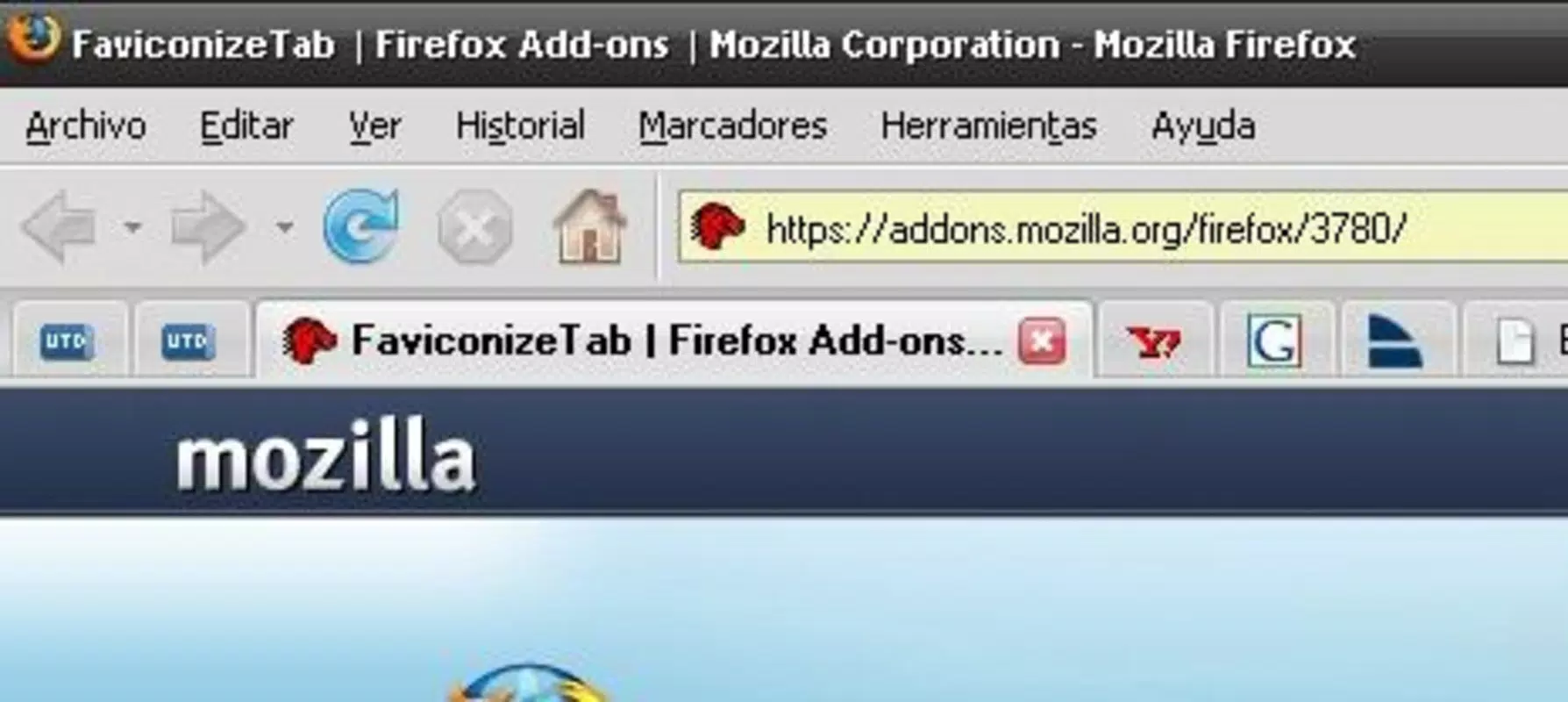
- Tab Resizing Functionality: Users can reduce open tabs to their favicon icons, significantly decreasing visual clutter. This feature is ideal for users managing 20 or more tabs simultaneously, allowing for a more organized and readable tab bar.
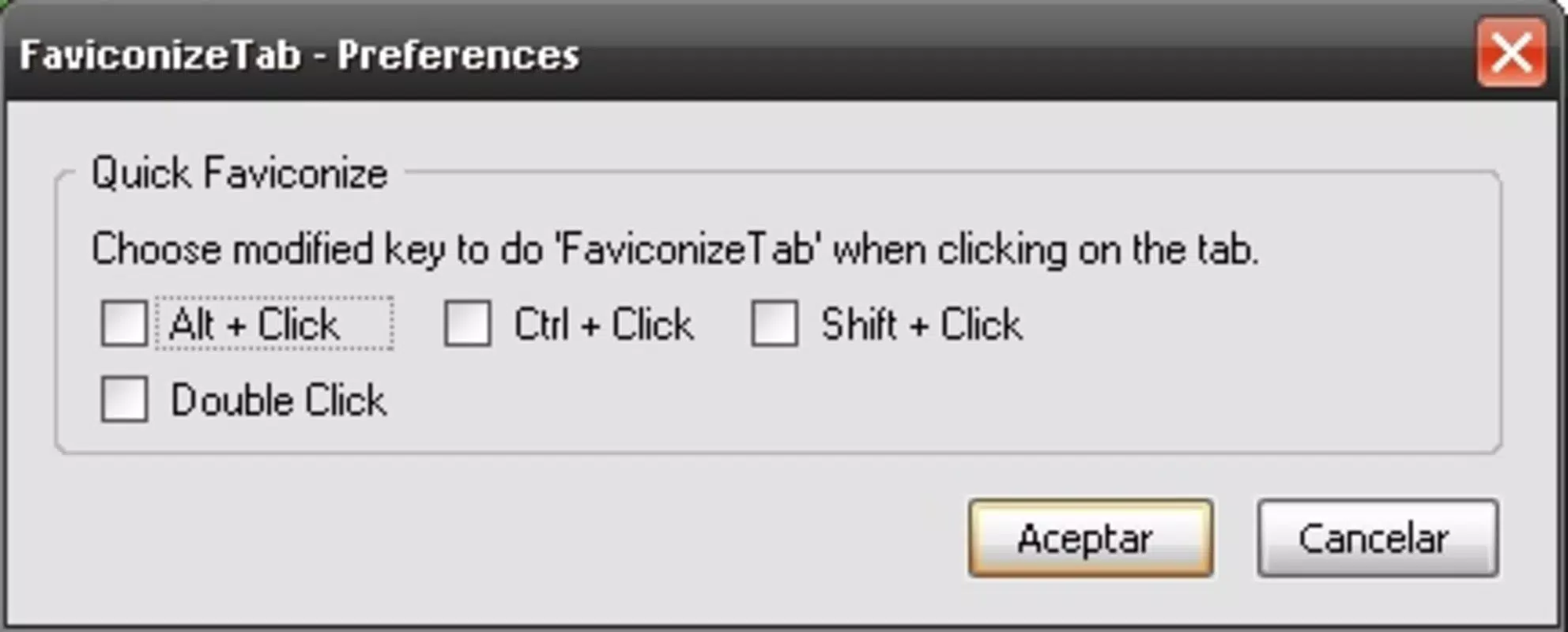
- Simple Control Mechanism: Activation requires holding down Alt, Ctrl, or Shift while clicking on any tab. This intuitive method ensures quick access without altering the default browsing workflow.
- Session Saving Options: Compatible with Firefox 2.0 and later, the add-on allows users to save browsing sessions with tabs in either original or minimized size. This preserves customized layouts across sessions.
- Improved Browsing Clarity: By displaying only icons, users can identify websites more quickly, reducing the time spent searching for specific tabs in a crowded tab strip.
- User-Friendly Interface: The add-on integrates seamlessly with Firefox’s interface, requiring no learning curve. It operates silently in the background, enhancing usability without disrupting the browsing experience.
For example, a student researching multiple topics can minimize irrelevant tabs to icons, keeping only key sources visible. Similarly, a digital marketer monitoring several campaign dashboards can maintain a clean tab bar while preserving access to all resources. These practical applications demonstrate how Faviconize Tab enhances focus and efficiency in real-world scenarios.
Interface, UX & Performance
Faviconize Tab maintains a minimalist interface that aligns with Firefox’s native design language. The visual style is unobtrusive, ensuring that the tab bar remains consistent with the browser’s overall aesthetic. Navigation is intuitive: users trigger the minimize function through a simple keyboard-and-click combination, eliminating the need for additional menus or settings panels.
The user experience is streamlined and efficient, with no noticeable delays or lag during tab resizing. Although the developer did not list formal performance metrics, the app’s lightweight size of 512 KB suggests minimal impact on system resources. It operates smoothly across various device categories, including desktops and laptops with standard configurations.
Responsiveness is consistent, with immediate feedback upon activation. Stability appears reliable, supported by the app’s long-term availability since 2011. Users can expect consistent behavior across Firefox updates, though compatibility may depend on the specific Firefox version in use. The app does not introduce pop-ups, notifications, or background processes that could interfere with browsing.
Platform Compatibility & Technical Requirements
Faviconize Tab is designed exclusively for the Firefox browser. The app is compatible with Firefox 2.0 and later versions, ensuring broad accessibility across older and newer installations. The file size is 512 KB, indicating a lightweight installation that does not strain storage or memory.
The developer did not specify minimum OS requirements, nor did they provide information on compatibility with mobile versions of Firefox. As such, users should verify the app’s availability on their specific Firefox installation. The software version is 1.0.0, and the app remains free to download and use.
Pros and Cons
Pros
- Lightweight design with minimal system impact
- Simple, intuitive control mechanism using keyboard modifiers
- Effective tab minimization for improved visual clarity
- Session preservation with customizable tab size settings
- Free to download and use with no in-app purchases
Cons
- Exclusive to Firefox browser; not available on other platforms
- Developer did not provide detailed technical specifications
- Compatibility with mobile Firefox versions is unclear
- Limited to desktop environments based on current information
- No visible update notifications or automatic update mechanism
FAQ
Is Faviconize Tab safe to install?
Yes, the app is free and developed by a known contributor. It operates within Firefox’s add-on framework and does not collect user data or display advertisements.
Can I use Faviconize Tab on mobile Firefox?
The developer did not specify mobile compatibility. Based on current information, the app is intended for desktop Firefox installations.
Does Faviconize Tab require an internet connection?
No, the app functions offline. It operates locally within Firefox and does not rely on external servers for core functionality.
How do I uninstall Faviconize Tab?
Users can remove the add-on through Firefox’s Add-ons Manager by navigating to the Extensions section and selecting "Remove."
Is Faviconize Tab compatible with the latest version of Firefox?
While the app supports Firefox 2.0 and later, compatibility with the most recent Firefox versions has not been explicitly confirmed by the developer.
Final Thoughts + CTA
Faviconize Tab remains a niche yet highly effective tool for Firefox users overwhelmed by tab overload. Its ability to minimize tabs to icons provides a tangible improvement in browsing clarity and workflow efficiency. Despite its age, the app continues to deliver consistent performance with a minimal footprint and zero cost.
It is especially valuable for professionals, students, and researchers who rely on multiple open tabs for daily tasks. The straightforward interface and simple activation method ensure accessibility for users of all experience levels. While it lacks modern features like auto-saving or cloud sync, its core purpose is fulfilled with precision.
For anyone seeking a reliable, free utility to enhance their Firefox experience, Faviconize Tab offers a practical solution. Download Faviconize Tab now to transform your browsing workflow and reclaim your screen space.


